Ready-made templates with Webhooks
Pre-configured flows with Webhooks, ready to activate in a few clicks.


When Pluga Webhooks receives a notification from your tool, add data to a new row on a Google Sheets spreadsheet

For each response on a Facebook Lead Ads advertisement, send a notification to your app/system through Pluga Webhooks

When Pluga Webhooks receives a notification from your tool, include or update the lead on RD Station Marketing

When Pluga Webhooks receives a notification from your tool, create/update a deal on Pipedrive

For each deal moved to a certain stage in the RD Station CRM funnel, send a notification to your app/system through Pluga Webhooks
Webhooks in practice
How different teams use Webhooks in everyday automations.
-
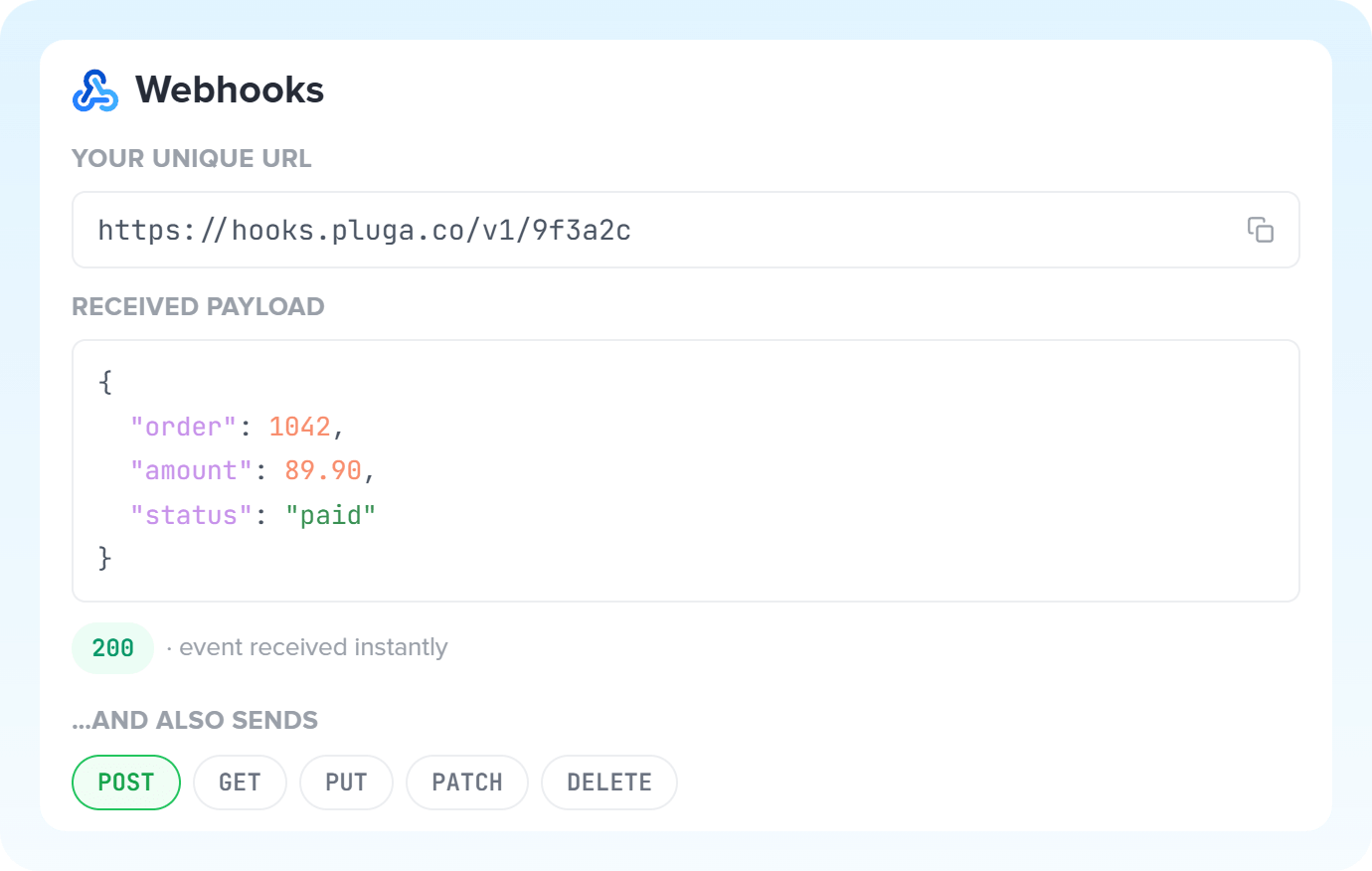
Proprietary forms or forms without a native integration trigger a notification to Pluga's webhook URL. Each lead lands instantly in the marketing automation or CRM, with no one downloading spreadsheets or uploading CSVs.
Capture leads with Webhooks -
When a sale is completed, whether a course, subscription or physical product, Pluga receives the payment notice and acts right away: the customer enters the CRM, gets access to the members area and receives the welcome message.
Connect a sales platform via Webhooks -
Conversation events, support chatbots or scheduling reach Pluga immediately, which fires the notification: the existing contact card gets the new status, the latest interaction and an updated history. The sales team works with data that's always current, with no re-registering records.
Update customer data with Webhooks -
When a customer cancels, a contract ends or a subscription is interrupted, Pluga steps in: access to the members area is revoked and the profile is updated in the billing app the moment the cancellation happens.
Close out records with Webhooks
All automations with Webhooks
-

Agendor
-

Reportei
-

Omie ERP
-

Bling
-

Hotmart
-

Ploomes
-

Conta Azul
-

Asaas
-

HubSpot
-

Omie CRM
-

RD Station CRM
-

Moskit CRM
-

NectarCRM
-

Sympla
-

WooCommerce
-
Pipedrive
-

PipeRun
-

iugu
-

Vindi Recorrência
-

Pagar.me
-

Ramper Marketing
-

Loja Integrada
-
Google Sheets
-

Pipefy
-

Meets
-

Bitrix24
-

PayPal
-

Notion
-

ActiveCampaign
-

Google Calendar
-

Olist
-

Adobe Commerce 1.X (Magento)
-

Kommo
-

Mercado Pago
-
RD Station Marketing
-

Leadlovers
-

Todoist
-

Superlógica Assinaturas
-

monday.com
-

ClickUp
-

Yampi
-

Tiendanube
-

Clicksign
-

vhsys
-

BomControle
-

flwchat
-

Guru
-

Mercos
-

Nibo
-

Stripe
-

PagBank
-

Gmail
-

Trello
-

MemberKit
-

Kiwify
-

Granatum Financeiro
-

Zendesk
-

Eduzz
-

Instagram Business
-

Code
-

Airtable
-

Intercom
-

Asana
-

ZapSign
-

Manychat
-

Google Contacts
-

Excel
-

JivoChat
-

Calendly
-

Twilio
-

Google Docs
-

eNotas
-

Jira Software Cloud
-

Mailchimp
-

Bkper
-

Zoho CRM
-

Slack
-

Facebook Custom Audiences
-

NFe.io
-

Telegram Bot
-

Mandrill
-

Z-API
-

Supabase
-

Loop
-

AI Extraction
-

Whapi
-
Evolution API
-

Typeform
-

Google Forms
-
Facebook Lead Ads
-

Google Lead Form
-

Discord
-

Ramper Pipeline
-

TikTok Ads
-

Zenvia Canais
-

Mautic
-
RD Station CRM (legado)
-

Jotform
-

Gravity Forms
-

Facebook Pages
-

Linkedin Lead Ads
-

Microsoft Teams
-

Adobe Commerce 2.X (Magento)
-

Shopify
-

E-goi
-

WhatsApp Business API
-

Blip
-

Vindi Pagamentos
-

Tally
-

Microsoft Outlook
-

SendGrid
-

Squarespace
-

Webflow
-

Eventbrite
-

MCP
-

Mercado Libre
-

Kobana
-

Google Drive
-

ChatGPT
-

Google Gemini
-

Lovable
-

SendPulse
-

Claude (Anthropic)
-

AI Toolkit
-

Scheduler
-

AI Agents
-

Router
-

AI Classification
-

HTTP Request
-

AI Summarization
-
AI Translation
-

Delay
-

Facebook Ads Insights
-

Formatter
-

Switch Guard
Trusted by over 10.000 companies










Triggers and Actions of Webhooks
The trigger is the event that starts the flow with Webhooks, while the action is the task Pluga performs automatically on that app.
Received notification
When Webhooks receives a notification from your tool
- Capture events from a tool outside the hub, such as a new sale, abandoned cart, or new signup
- Receive lists of items at once (arrays)
- Start a workflow from an internal system
Date and time (UTC) when the order was captured by Pluga
API new request
For each new request from Webhooks to your tool
- Start a workflow from a system without a native integration
- Use an event from your own API as the trigger
- Capture data from your company's internal tools
Send a message via Pluga Webhooks
send a notification to your app/system via Webhooks
- Create a record in a tool that Pluga doesn't integrate with
- Update an existing record (PUT or PATCH)
- Delete a record (DELETE)
- Notify an internal system whenever an event occurs
API URL of the tool Required
Tool fields
Headers
Query Params of the request
How to integrate with Webhooks
Frequently Asked Questions
Everything you need to know to get started with Webhooks on Pluga.
