Ready-made templates with Classificação por IA
Pre-configured flows with Classificação por IA, ready to activate in a few clicks.



Score Facebook Lead Ads leads from 1 to 5 using AI Lead Scoring and save the score in RD Station CRM.



Categorize Zendesk tickets by support level (L1, L2, or Finance) using AI Classification and notify the appropriate Slack channel.


Segment Typeform responses by interest profile using AI Classification and create the deal in Pipedrive


Classify Google Forms NPS feedback as Promoter, Passive, or Detractor using AI Classification and store the results in Supabase.


Categorize Gmail emails by department using AI Classification and create a Trello task for the responsible team.
Classificação por IA in practice
How different teams use Classificação por IA in everyday automations.
-
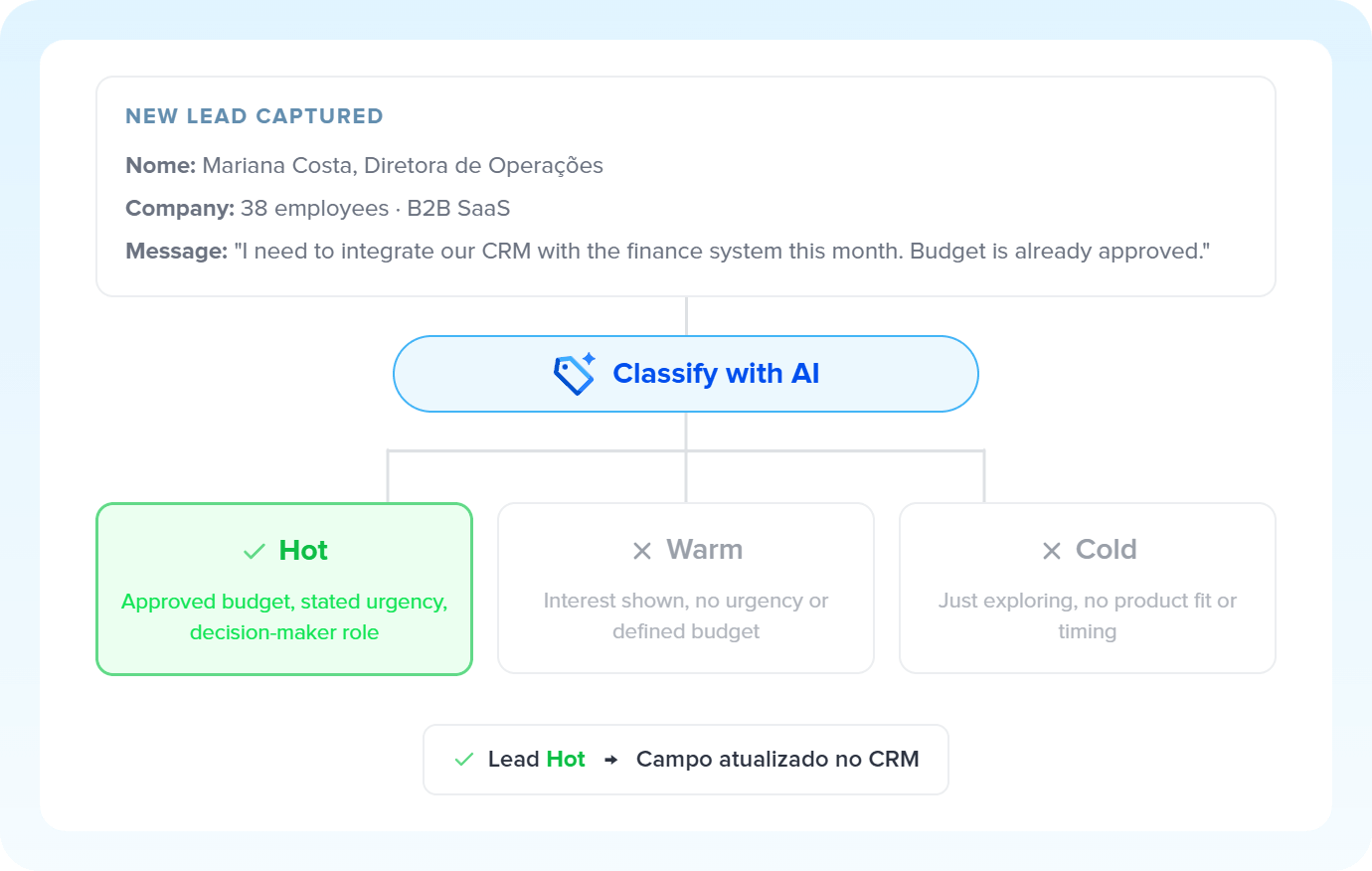
Every lead captured from ads or forms is analyzed by AI and sorted into pre-defined temperature ranges. The result fills the CRM's qualification field, ready for the rep to prioritize.
Qualify leads with AI Classification -
Every opened ticket is read by AI and categorized by level or department. The result goes out as a Slack notification or an entry in the responsible rep's or specialist's view.
Triage tickets with AI Classification -
Form responses or satisfaction surveys enter the flow. AI identifies each respondent's profile. The contact already gets the right tag in the marketing app and moves into the appropriate nurture track.
Segment contacts with AI Classification -
Internal requests, contracts and operational emails are categorized by AI according to department. Each record follows the correct flow: finance, legal, sales or support.
Categorize documents with AI Classification
All automations with Classificação por IA
-
Facebook Lead Ads
-
RD Station CRM
-
Slack
-
Zendesk
-
Roteador
-
Typeform
-
Pipedrive
-
Google Forms
-
Supabase
-
Gmail
-
Trello
-

Agendor
-

Agendador
-

RD Station Marketing
-

Loop
-

Omie ERP
-

Google Sheets
-

Bling
-

Asaas
-

Ploomes
-

Hotmart
-

HubSpot
-

Conta Azul
-

Pipefy
-

Omie CRM
-

ActiveCampaign
-

Moskit CRM
-

PipeRun
-

Olist
-

Vindi Recorrência
-

Notion
-

iugu
-

Excel
-

NectarCRM
-

Airtable
-

Bitrix24
-

Kommo
-

Webhooks
-

Twilio
-

Microsoft Outlook
-

Adobe Commerce 2.X (Magento)
-

Google Docs
-

Leadlovers
-

Ramper Marketing
-

Sympla
-

Loja Integrada
-

Whapi
-

WooCommerce
-

Pagar.me
-

Superlógica Assinaturas
-

Todoist
-

monday.com
-

ClickUp
-

Clicksign
-

Shopify
-

Reportei
-

Manychat
-

MemberKit
-

Mercado Pago
-

Mailchimp
-

Mautic
-

Intercom
-

Meets
-

SendGrid
-

Telegram Bot
-

Adobe Commerce 1.X (Magento)
-

vhsys
-

Nibo
-

Squarespace
-

Discord
-

Microsoft Teams
-

Bom Controle
-

WhatsApp Business API
-

Z-API
-

Evolution API
-

Asana
-

Jira Software Cloud
-

Facebook Custom Audiences
-

Google Contacts
-

Ramper Pipeline
-

Blip
-

E-goi
-

Google Calendar
-

Webflow
-

flwchat
-

Zenvia Canais
-

Mercos
-

ZapSign
-

PayPal
-

PagBank
-

Nuvemshop (Tiendanube)
-

Yampi
-

Guru
-

Kiwify
-

Eventbrite
-

Stripe
-

Vindi Pagamentos
-

JivoChat
-

Granatum Financeiro
-

Tally
-

Gravity Forms
-

Calendly
-

RD Station CRM (legado)
-

Zoho CRM
-

Eduzz
-

eNotas
-

Linkedin Lead Ads
-

Mandrill
-

Jotform
-

NFe.io
-

TikTok Ads
-

Google Lead Form
-

MCP
-

Mercado Livre
-

Kobana
-

Google Drive
-

ChatGPT
-

Instagram Business
-

Google Gemini
-

Bkper
-

Lovable
-

Facebook Pages
-

SendPulse
-

Claude (Anthropic)
-

Kit de IA
-

Code
-

Agentes de IA
-

HTTP Request
-

Extração por IA
-

Resumo por IA
-

Delay
-

Facebook Ads Insights
-

Formatador
-

Interruptor
-

Tradução por IA
Trusted by over 10.000 companies










Available actions with Classificação por IA
The action is the task Pluga performs automatically on Classificação por IA, every time a trigger runs.
Classify content
Classifies texts into categories of the same scale (ex: hot, warm or cold lead)
- Segment leads by temperature (hot, warm, or cold)
- Route support tickets by support level (L1, L2, Finance, etc.)
- Analyze form responses by interest profile
- Categorize NPS feedback as Promoter, Passive, or Detractor
Model Required
Information to be classified Required
Categories
How to integrate with Classificação por IA
Frequently Asked Questions
Everything you need to know to get started with Classificação por IA on Pluga.
