Ready-made templates with Interruptor
Pre-configured flows with Interruptor, ready to activate in a few clicks.



Nurture opportunities on WhatsApp with the AI Agent and hand over the conversation when the sales team takes over the deal
Answer shipping tracking and return questions on WhatsApp with the AI Agent and pause automated responses with the Switch when a human takes over the conversation
Qualify product launch campaign leads on WhatsApp with the AI Agent and hand them off to a sales representative at the right time
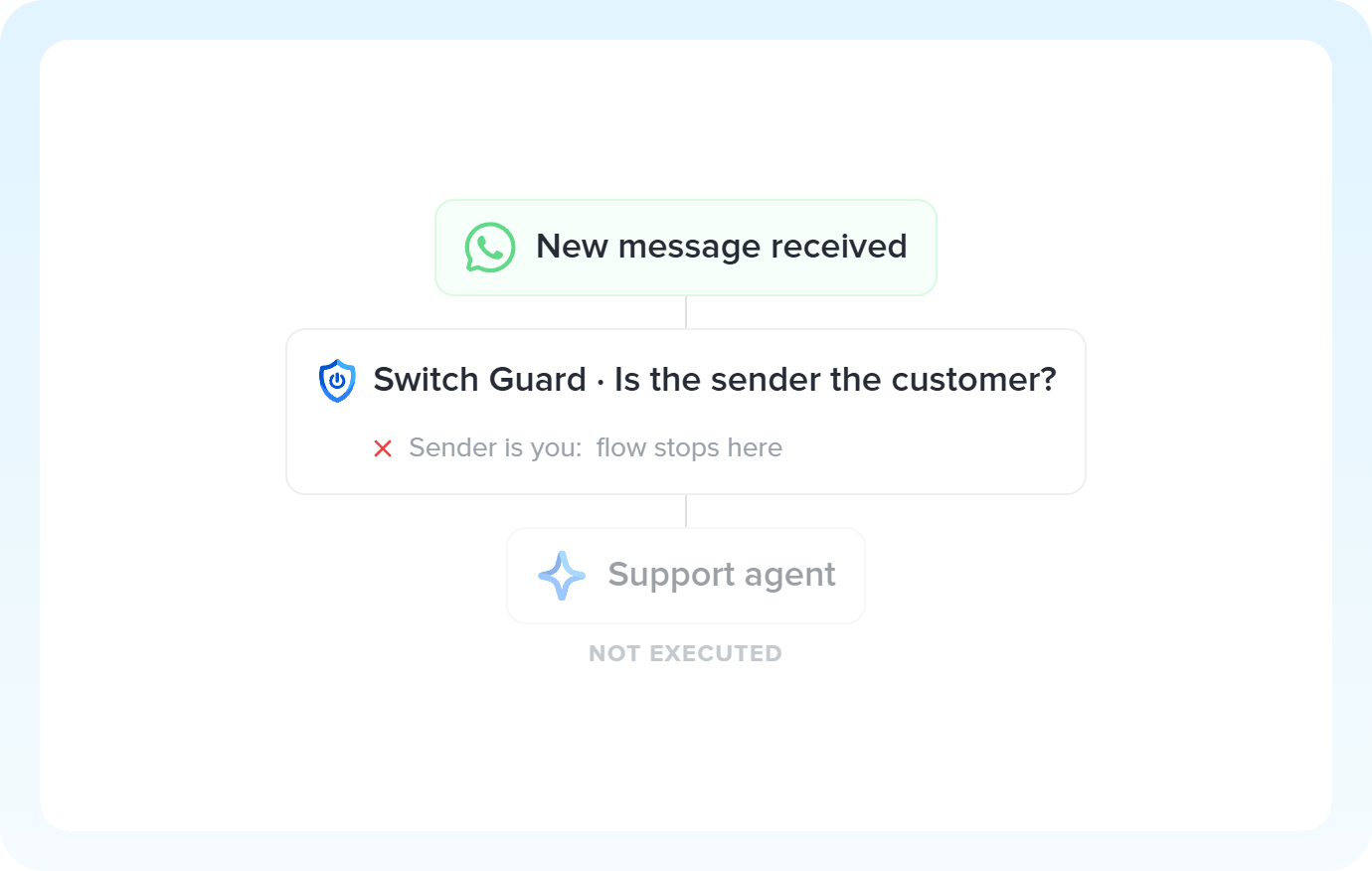
When the technical support team takes over a conversation on WhatsApp, the Switch ensures the Agent doesn't respond over them

Handle customer conversations on Telegram with the AI Agent and pause automated responses when a team member joins the conversation
Interruptor in practice
How different teams use Interruptor in everyday automations.
-
When the deal progresses, the rep takes over and Switch pauses the agent's replies. Every time the rep responds, the pause window renews. No interruptions at the critical moment of closing.
Control pauses with Switch -
Order tracking, exchanges and returns are things the agent handles. But some cases call for a human. When the rep takes over, Switch pauses the agent for that customer.
Prioritize humans with Switch -
During a launch, the agent can answer questions at scale. But when someone from the team wants to talk directly to a lead, Switch pauses the agent for that contact until the personal conversation ends.
Silence the agent with Switch -
The agent covers the first level of support and escalates the rest. As soon as the technician takes over the conversation, Switch pauses the agent: during the configured window, only human replies reach the customer.
Escalate without conflict
All automations with Interruptor
-
Agentes de IA
-
WhatsApp Business API
-
Telegram Bot
-

Omie ERP
-

Agendor
-

Google Sheets
-

Bling
-

Asaas
-

Ploomes
-

Hotmart
-

Gmail
-

HubSpot
-

Conta Azul
-

Pipefy
-

Omie CRM
-

Pipedrive
-

ActiveCampaign
-

Moskit CRM
-

RD Station CRM
-

PipeRun
-

Olist
-

RD Station Marketing
-

Vindi Recorrência
-

Notion
-

iugu
-

Excel
-

NectarCRM
-

Airtable
-

Bitrix24
-

Kommo
-

Trello
-

Webhooks
-

Twilio
-

Microsoft Outlook
-

Adobe Commerce 2.X (Magento)
-

Google Docs
-

Leadlovers
-

Ramper Marketing
-

Sympla
-

Loja Integrada
-

Whapi
-

WooCommerce
-

Pagar.me
-

Superlógica Assinaturas
-

Slack
-

Todoist
-

monday.com
-

ClickUp
-

Clicksign
-

Shopify
-

Reportei
-

Manychat
-

MemberKit
-

Mercado Pago
-

Mailchimp
-

Mautic
-

Intercom
-

Meets
-

SendGrid
-

Adobe Commerce 1.X (Magento)
-

vhsys
-

Nibo
-

Squarespace
-

Discord
-

Microsoft Teams
-

Bom Controle
-

Z-API
-

Evolution API
-

Asana
-

Jira Software Cloud
-

Facebook Custom Audiences
-

Google Contacts
-

Ramper Pipeline
-

Blip
-

E-goi
-

Google Calendar
-

Webflow
-

flwchat
-

Zenvia Canais
-

Mercos
-

ZapSign
-

PayPal
-

PagBank
-

Nuvemshop (Tiendanube)
-

Yampi
-

Guru
-

Kiwify
-

Eventbrite
-

Stripe
-

Vindi Pagamentos
-

JivoChat
-

Typeform
-

Google Forms
-

Granatum Financeiro
-

Zendesk
-

Tally
-

Gravity Forms
-

Calendly
-

Facebook Lead Ads
-

RD Station CRM (legado)
-

Zoho CRM
-

Eduzz
-

eNotas
-

Linkedin Lead Ads
-

Mandrill
-

Jotform
-

NFe.io
-

TikTok Ads
-

Google Lead Form
-

MCP
-

Mercado Livre
-

Kobana
-

Google Drive
-

ChatGPT
-

Instagram Business
-

Google Gemini
-

Supabase
-

Bkper
-

Lovable
-

Facebook Pages
-

SendPulse
-

Claude (Anthropic)
-

Agendador
-

Kit de IA
-

Code
-

Loop
-

Roteador
-

Classificação por IA
-

HTTP Request
-

Extração por IA
-

Resumo por IA
-

Delay
-

Facebook Ads Insights
-

Formatador
-

Tradução por IA
Trusted by over 10.000 companies










Available actions with Interruptor
The action is the task Pluga performs automatically on Interruptor, every time a trigger runs.
Interromper fluxo
Interruptor
- Prevent an AI agent from responding while a human is actively handling the same conversation
- Avoid duplicate or conflicting responses in automated support channels
- Pause a sensitive workflow for a set period without disabling the entire automation
- Pause a specific conversation without affecting other automations in progress
Evaluated information Required
Condition type Required
Comparison value Required
Flow identifier Required
Interruption duration selection mode
Interruption duration
Interruption duration (minutes)
How to integrate with Interruptor
Frequently Asked Questions
Everything you need to know to get started with Interruptor on Pluga.
