Ready-made templates with Loop
Pre-configured flows with Loop, ready to activate in a few clicks.



Add each product from a Nuvemshop order as a separate row in Google Sheets.


When a deal is marked as won in RD Station CRM, use Loop to create a new Notion page for each service listed in the deal.


Search your Google Sheets spreadsheet for overdue customers every week and send payment reminders via WhatsApp


Loop through items from Webhooks notifications and create each one as an accounts receivable entry in Conta Azul.


When a sales order is created in Bling, send the data for each order item to a new row in Supabase.
Loop in practice
How different teams use Loop in everyday automations.
-
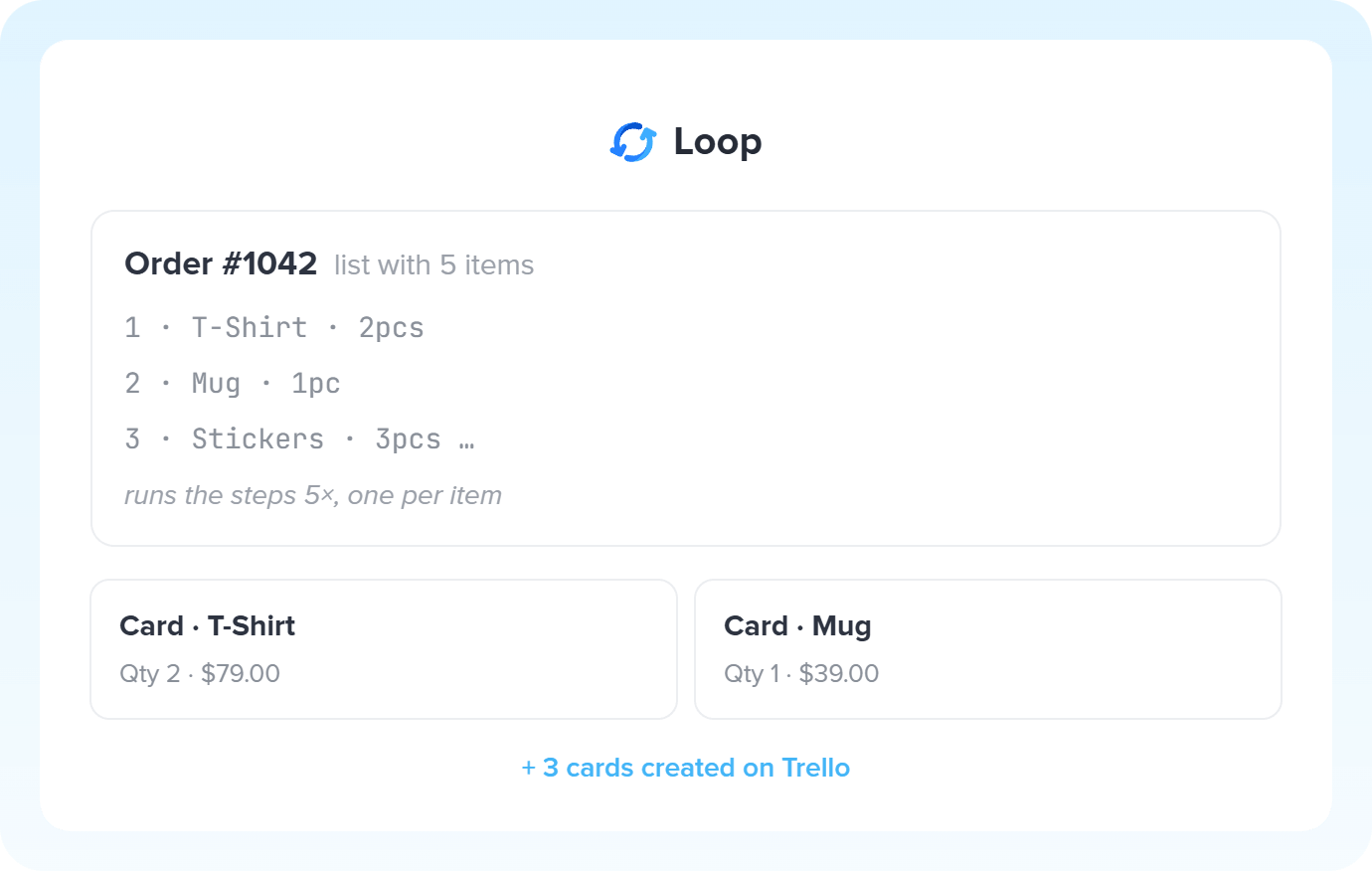
A sale with 8 products becomes 8 independent runs. Each product gets its own row in the spreadsheet, task in the manager, or stock update, always arriving organized the right way.
See sales templates -
A new order arrives with several items, each with its own amount and due date. Loop splits that order into parts and finance receives each one as an independent bill to pay, with the correct dates and amounts.
Post bills with Loop -
Searches in external systems can return information in bulk, with dozens of records bundled together. Loop opens that bundle and splits the results into units: each ticket, a notification. Each lead, a task.
Split lists with Loop -
Not every item in a list needs the same routing. By combining Loop with other tools, like Router, each object follows its own path, according to the company's specific processes.
Combine Loop with other apps -
A deal won in the CRM with several items? Loop processes each one and turns it into a card in the manager, an entry in the ERP, or a step in project tracking. Sales already hands everything off separated for operations.
Iterate over deals with Loop
All automations with Loop
-

Slack
-
Agendador
-
Google Sheets
-
RD Station CRM
-

Trello
-
Nuvemshop (Tiendanube)
-
WhatsApp Business API
-
Webhooks
-
Conta Azul
-
Bling
-
Supabase
-
Notion
-

Google Gemini
-

RD Station Marketing
-

Classificação por IA
-

Pipedrive
-

ClickUp
-

Gmail
-

Zendesk
-

Resumo por IA
-

Code
-

Omie ERP
-

Agendor
-

Asaas
-

Ploomes
-

Hotmart
-

HubSpot
-

Pipefy
-

Omie CRM
-

ActiveCampaign
-

Moskit CRM
-

PipeRun
-

Olist
-

Vindi Recorrência
-

iugu
-

Excel
-

NectarCRM
-

Airtable
-

Bitrix24
-

Kommo
-

Twilio
-

Microsoft Outlook
-

Adobe Commerce 2.X (Magento)
-

Google Docs
-

Leadlovers
-

Ramper Marketing
-

Sympla
-

Loja Integrada
-

Whapi
-

WooCommerce
-

Pagar.me
-

Superlógica Assinaturas
-

Todoist
-

monday.com
-

Clicksign
-

Shopify
-

Reportei
-

Manychat
-

MemberKit
-

Mercado Pago
-

Mailchimp
-

Mautic
-

Intercom
-

Meets
-

SendGrid
-

Telegram Bot
-

Adobe Commerce 1.X (Magento)
-

vhsys
-

Nibo
-

Squarespace
-

Discord
-

Microsoft Teams
-

Bom Controle
-

Z-API
-

Evolution API
-

Asana
-

Jira Software Cloud
-

Facebook Custom Audiences
-

Google Contacts
-

Ramper Pipeline
-

Blip
-

E-goi
-

Google Calendar
-

Webflow
-

flwchat
-

Zenvia Canais
-

Mercos
-

ZapSign
-

PayPal
-

PagBank
-

Yampi
-

Guru
-

Kiwify
-

Eventbrite
-

Stripe
-

Vindi Pagamentos
-

JivoChat
-

Typeform
-

Google Forms
-

Granatum Financeiro
-

Tally
-

Gravity Forms
-

Calendly
-

Facebook Lead Ads
-

RD Station CRM (legado)
-

Zoho CRM
-

Eduzz
-

eNotas
-

Linkedin Lead Ads
-

Mandrill
-

Jotform
-

NFe.io
-

TikTok Ads
-

Google Lead Form
-

MCP
-

Mercado Livre
-

Kobana
-

Google Drive
-

ChatGPT
-

Instagram Business
-

Bkper
-

Lovable
-

Facebook Pages
-

SendPulse
-

Claude (Anthropic)
-

Kit de IA
-

Agentes de IA
-

Roteador
-

HTTP Request
-

Extração por IA
-

Delay
-

Facebook Ads Insights
-

Formatador
-

Interruptor
-

Tradução por IA
Trusted by over 10.000 companies










Available actions with Loop
The action is the task Pluga performs automatically on Loop, every time a trigger runs.
Loop through a list
Loops through the items in a list and repeats the next actions for each one
- Turn each product in an order into its own row in a spreadsheet or task in your project management tool
- Loop through search results (tickets, leads, or orders) and trigger the next action for each item
- Process batches of data received through a webhook or API response
- Apply specific rules to each item by combining Loop with Formatter, Router, or HTTP Request
List Required
How to integrate with Loop
Frequently Asked Questions
Everything you need to know to get started with Loop on Pluga.
