Ready-made templates with Tradução por IA
Pre-configured flows with Tradução por IA, ready to activate in a few clicks.


Translate project briefs received in Gmail from other languages using AI Translation and create a translated Trello card.


When a Zendesk ticket is created in another language, translate its content using AI and send it to your team on Slack.


Use AI to translate product descriptions stored in Google Sheets and upload them to an international marketplace.

Use AI to translate bug notifications logged in Supabase and notify your technical team on Slack.


When an international Typeform form is submitted, use AI to translate the responses and create a lead in RD Station CRM
Tradução por IA in practice
How different teams use Tradução por IA in everyday automations.
-
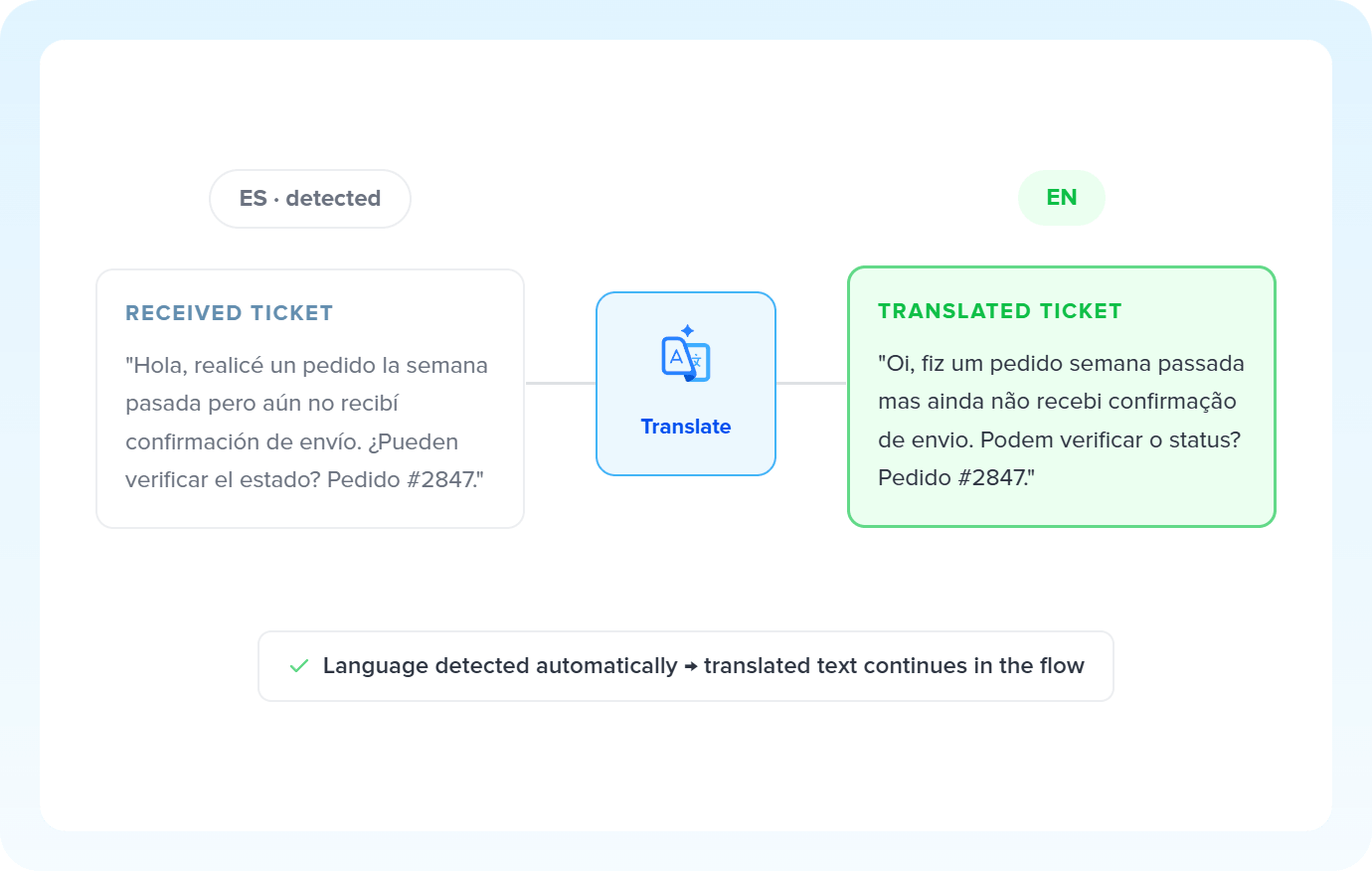
Customers from other countries open tickets in their own language. AI detects the source language, translates the content into Portuguese, and the support team already receives a readable ticket, with no communication barriers.
Translate tickets with AI -
Newly registered products need English or Spanish versions. AI translates each description and updates the corresponding column. Then it's just a matter of uploading it to the international marketplace.
Translate catalogs with AI -
Guidance from headquarters, supplier specs or technical documents that arrive in another language are translated by AI. The team already receives the content in their own language, as a task in the manager.
Translate briefs with AI -
Campaign copy, posts and communications created in Portuguese are translated into the target market's language. AI delivers the version ready for the sending or publishing app.
Localize content with AI
All automations with Tradução por IA
-
Slack
-
Gmail
-
Trello
-
Zendesk
-
Google Sheets
-
HTTP Request
-
Supabase
-
Typeform
-
RD Station CRM
-

Omie ERP
-

Agendor
-

Bling
-

Asaas
-

Ploomes
-

Hotmart
-

HubSpot
-

Conta Azul
-

Pipefy
-

Omie CRM
-

Pipedrive
-

ActiveCampaign
-

Moskit CRM
-

PipeRun
-

Olist
-

RD Station Marketing
-

Vindi Recorrência
-

Notion
-

iugu
-

Excel
-

NectarCRM
-

Airtable
-

Bitrix24
-

Kommo
-

Webhooks
-

Twilio
-

Microsoft Outlook
-

Adobe Commerce 2.X (Magento)
-

Google Docs
-

Leadlovers
-

Ramper Marketing
-

Sympla
-

Loja Integrada
-

Whapi
-

WooCommerce
-

Pagar.me
-

Superlógica Assinaturas
-

Todoist
-

monday.com
-

ClickUp
-

Clicksign
-

Shopify
-

Reportei
-

Manychat
-

MemberKit
-

Mercado Pago
-

Mailchimp
-

Mautic
-

Intercom
-

Meets
-

SendGrid
-

Telegram Bot
-

Adobe Commerce 1.X (Magento)
-

vhsys
-

Nibo
-

Squarespace
-

Discord
-

Microsoft Teams
-

Bom Controle
-

WhatsApp Business API
-

Z-API
-

Evolution API
-

Asana
-

Jira Software Cloud
-

Facebook Custom Audiences
-

Google Contacts
-

Ramper Pipeline
-

Blip
-

E-goi
-

Google Calendar
-

Webflow
-

flwchat
-

Zenvia Canais
-

Mercos
-

ZapSign
-

PayPal
-

PagBank
-

Nuvemshop (Tiendanube)
-

Yampi
-

Guru
-

Kiwify
-

Eventbrite
-

Stripe
-

Vindi Pagamentos
-

JivoChat
-

Google Forms
-

Granatum Financeiro
-

Tally
-

Gravity Forms
-

Calendly
-

Facebook Lead Ads
-

RD Station CRM (legado)
-

Zoho CRM
-

Eduzz
-

eNotas
-

Linkedin Lead Ads
-

Mandrill
-

Jotform
-

NFe.io
-

TikTok Ads
-

Google Lead Form
-

MCP
-

Mercado Livre
-

Kobana
-

Google Drive
-

ChatGPT
-

Instagram Business
-

Google Gemini
-

Bkper
-

Lovable
-

Facebook Pages
-

SendPulse
-

Claude (Anthropic)
-

Agendador
-

Kit de IA
-

Code
-

Loop
-

Agentes de IA
-

Roteador
-

Classificação por IA
-

Extração por IA
-
Resumo por IA
-

Delay
-

Facebook Ads Insights
-

Formatador
-

Interruptor
Trusted by over 10.000 companies










Available actions with Tradução por IA
The action is the task Pluga performs automatically on Tradução por IA, every time a trigger runs.
Translate
Converts text between languages (e.g., EN to ZH)
- Translate support tickets received in another language
- Translate international client briefs into your team's language
- Translate product descriptions for international marketplace listings
- Localize campaign copy for different markets and languages
Model Required
Information to be translated Required
Source Language Required
Target Language Required
How to integrate with Tradução por IA
Frequently Asked Questions
Everything you need to know to get started with Tradução por IA on Pluga.
