Ready-made templates with Agentes de IA
Pre-configured flows with Agentes de IA, ready to activate in a few clicks.



Answer shipping tracking and return questions on WhatsApp with the AI Agent and pause automated responses with the Switch when a human takes over the conversation

Handle customer conversations on Telegram with the AI Agent and pause automated responses when a team member joins the conversation
Qualify product launch campaign leads on WhatsApp with the AI Agent and hand them off to a sales representative at the right time
Nurture opportunities on WhatsApp with the AI Agent and hand over the conversation when the sales team takes over the deal
Receive messages on WhatsApp Business API and let your Agentes de IA (AI Agents) respond or perform tasks for you
Agentes de IA in practice
How different teams use Agentes de IA in everyday automations.
-
Every WhatsApp message triggers the AI Agent, which chats, understands the pain point, identifies purchase intent, and collects name, email and phone. When the lead is ready, the opportunity goes to the CRM already with a summary of the conversation.
Qualify leads with AI Agent -
Customer questions can come in at any time. The AI Agent checks connected manuals and policy documents, replies in the brand's tone of voice, and opens tickets when the case calls for a human.
Support customers with AI Agent -
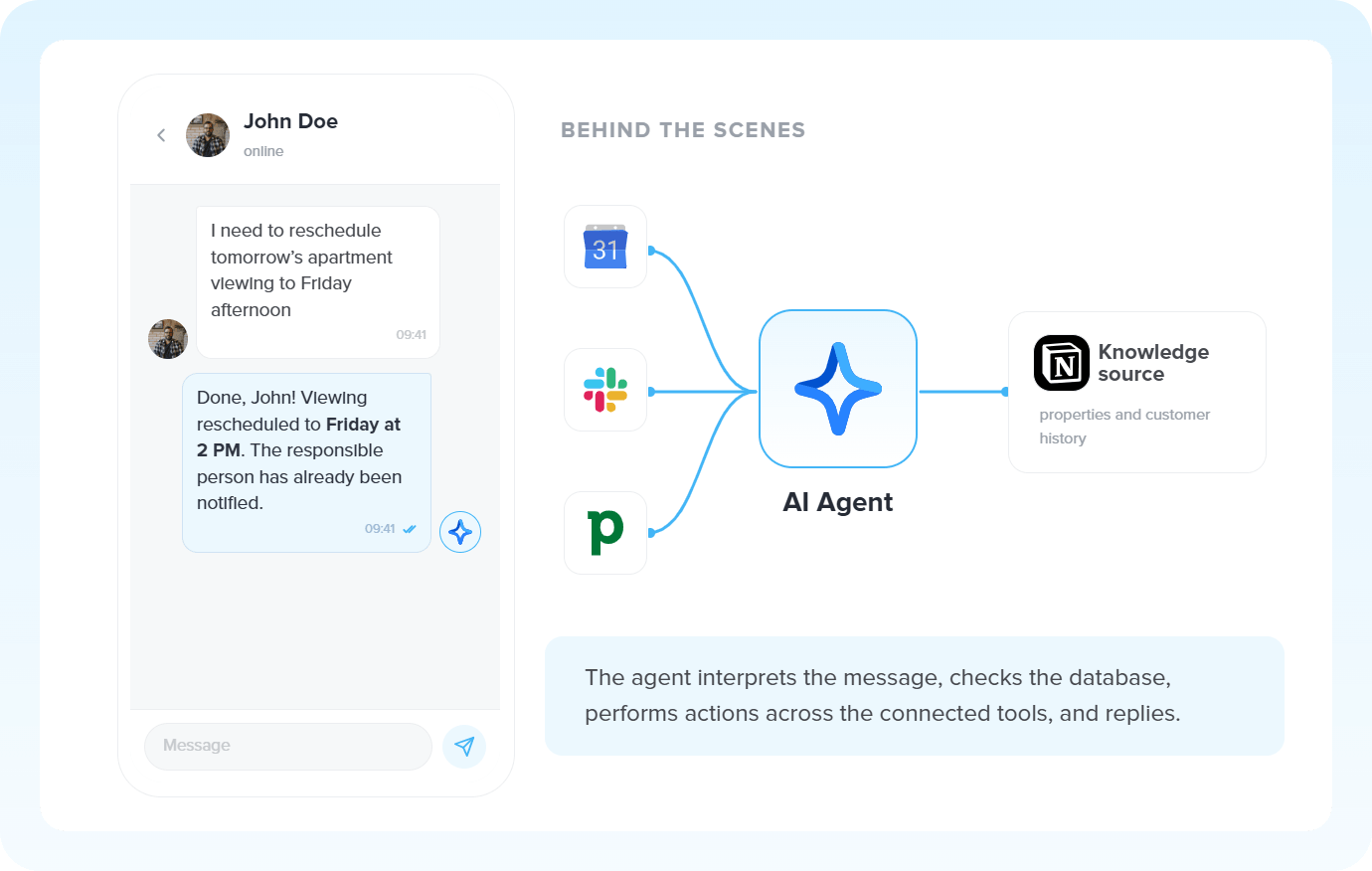
Set the Agent to read your calendar, spot scheduling conflicts, draft emails, create documents, and hand everything back ready to go. A digital teammate activated by text.
Manage tasks with AI Agent -
Exchange requests, tracking, or a second copy of an invoice: the AI Agent finds the order in the ERP, checks the status, replies to the customer, and logs the interaction in the CRM without needing an operator.
Automate post-sale with AI Agent
All automations with Agentes de IA
-
WhatsApp Business API
-
Interruptor
-

Z-API
-

Whapi
-

Evolution API
-

ActiveCampaign
-
Telegram Bot
-

Omie ERP
-

Agendor
-

Google Sheets
-

Bling
-

Asaas
-

Ploomes
-

Hotmart
-

Gmail
-

HubSpot
-

Conta Azul
-

Pipefy
-

Omie CRM
-

Pipedrive
-

Moskit CRM
-

RD Station CRM
-

PipeRun
-

Olist
-

RD Station Marketing
-

Vindi Recorrência
-

Notion
-

iugu
-

Excel
-

NectarCRM
-

Airtable
-

Bitrix24
-

Kommo
-

Trello
-

Webhooks
-

Twilio
-

Microsoft Outlook
-

Adobe Commerce 2.X (Magento)
-

Google Docs
-

Leadlovers
-

Ramper Marketing
-

Sympla
-

Loja Integrada
-

WooCommerce
-

Pagar.me
-

Superlógica Assinaturas
-

Slack
-

Todoist
-

monday.com
-

ClickUp
-

Clicksign
-

Shopify
-

Reportei
-

Manychat
-

MemberKit
-

Mercado Pago
-

Mailchimp
-

Mautic
-

Intercom
-

Meets
-

SendGrid
-

Adobe Commerce 1.X (Magento)
-

vhsys
-

Nibo
-

Squarespace
-

Discord
-

Microsoft Teams
-

Bom Controle
-

Asana
-

Jira Software Cloud
-

Facebook Custom Audiences
-

Google Contacts
-

Ramper Pipeline
-

Blip
-

E-goi
-

Google Calendar
-

Webflow
-

flwchat
-

Zenvia Canais
-

Mercos
-

ZapSign
-

PayPal
-

PagBank
-

Nuvemshop (Tiendanube)
-

Yampi
-

Guru
-

Kiwify
-

Eventbrite
-

Stripe
-

Vindi Pagamentos
-

JivoChat
-

Typeform
-

Google Forms
-

Granatum Financeiro
-

Zendesk
-

Tally
-

Gravity Forms
-

Calendly
-

Facebook Lead Ads
-

RD Station CRM (legado)
-

Zoho CRM
-

Eduzz
-

eNotas
-

Linkedin Lead Ads
-

Mandrill
-

Jotform
-

NFe.io
-

TikTok Ads
-

Google Lead Form
-

MCP
-

Mercado Livre
-

Kobana
-

Google Drive
-

ChatGPT
-

Instagram Business
-

Google Gemini
-

Supabase
-

Bkper
-

Lovable
-

Facebook Pages
-

SendPulse
-

Claude (Anthropic)
-

Agendador
-

Kit de IA
-

Code
-

Loop
-

Roteador
-

Classificação por IA
-

HTTP Request
-

Extração por IA
-

Resumo por IA
-

Delay
-

Facebook Ads Insights
-

Formatador
-

Tradução por IA
Trusted by over 10.000 companies










Available actions with Agentes de IA
The action is the task Pluga performs automatically on Agentes de IA, every time a trigger runs.
Run Agent
Runs an AI Agent to turn context into intelligent responses, decisions, and actions
- Interpret open ended customer messages and respond with the right tone
- Decide what action to take based on the knowledge and rules you provide
- Coordinate multiple tools within a single conversation
- Keep conversations flowing naturally without relying on rigid commands
Data sent to the agent
Input data
JSON Input data
Conversation identifier
Delay time before executing the agent (seconds)
How to integrate with Agentes de IA
Frequently Asked Questions
Everything you need to know to get started with Agentes de IA on Pluga.
