Ready-made templates with Code
Pre-configured flows with Code, ready to activate in a few clicks.



Use Python code to calculate Asaas fees based on the number of installments and record the final amount in Bling.


Calculate lead scores for Facebook Lead Ads leads using Code and create them in Pipedrive.


Receive notifications via Webhooks, process the payload using Code, and create a record in HubSpot


When a deal reaches a specific stage in Agendor, use Code to retrieve the company's full registration details from its CNPJ and populate a ZapSign contract with the data

Set up recurring API requests with Code and log the results in Google Sheets
Code in practice
How different teams use Code in everyday automations.
-
Fees by installment count, conditional cost-sharing between cost centers, specific taxation by service type: every transaction gets the same precision. The script calculates everything and the value is already normalized.
Code financial rules -
Leads captured from ads, forms and landing pages can arrive with irregular data: phone numbers without a country code, states written out in full, first and last name in a single field. Code cleans, standardizes and delivers everything ready for your CRM.
Standardize leads with Code -
Updated currency rates, shipping cost lookups in a logistics API, document validation and lookups in other systems: with Code, any accessible API can be used as part of the automation.
Connect APIs with Code -
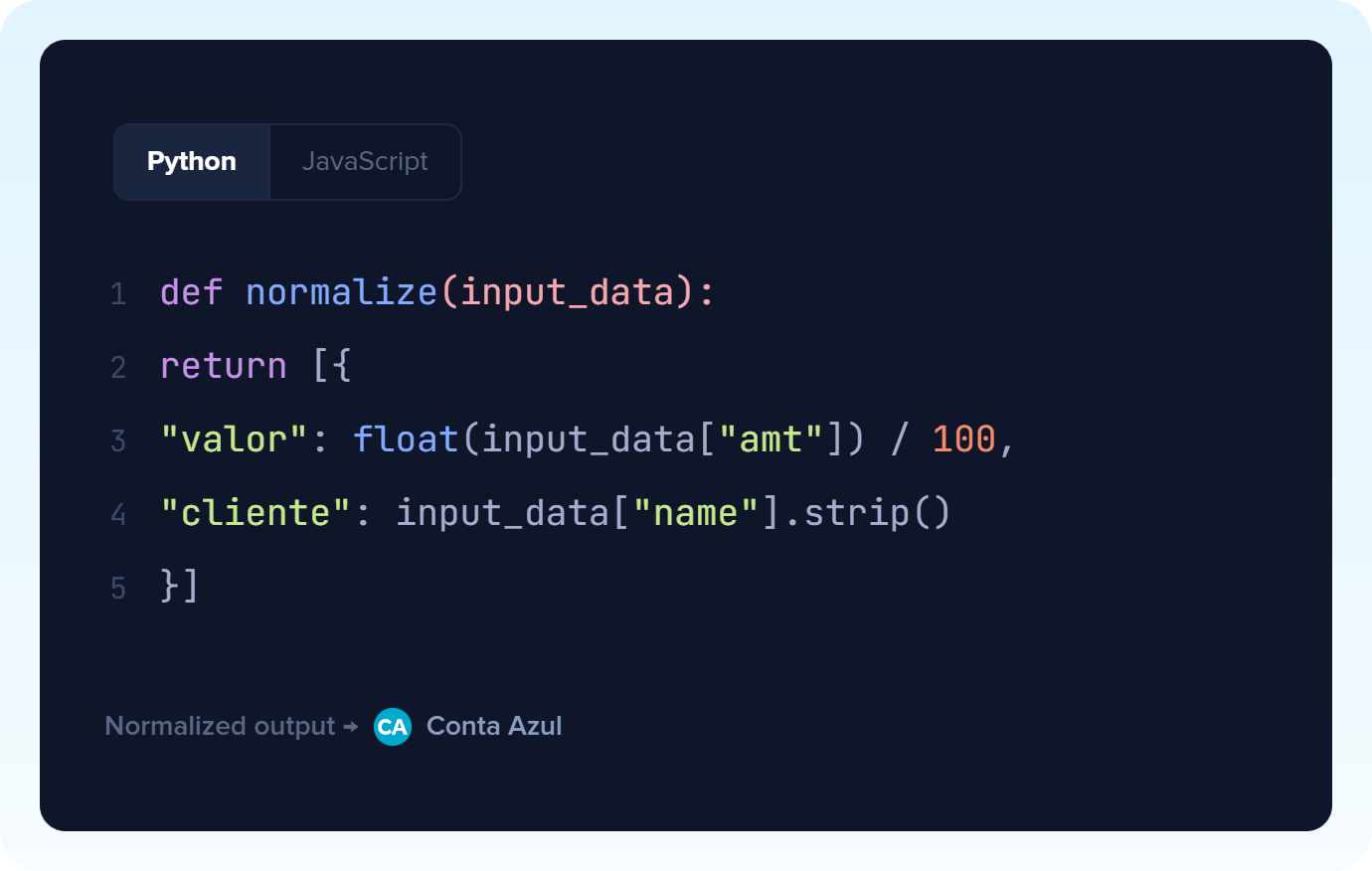
Data blocks that arrive in one format and need to leave in another, composite strings that would have to become multiple fields, nested arrays that are hard to map: apply a script that adjusts the data exactly the way you need, right in the flow.
Normalize payloads -
Lead scoring, discount policies, commission tiers, support priority: apply your business's own logic inside the automation flow. Different inputs, predictable outputs, always.
Apply a deterministic rule
All automations with Code
-
Google Sheets
-
Facebook Lead Ads
-
Pipedrive
-
Webhooks
-

RD Station CRM
-

Extração por IA
-

Gmail
-

Supabase
-

Loop
-

Roteador
-

Conta Azul
-

Nuvemshop (Tiendanube)
-
ZapSign
-
Agendor
-
HubSpot
-
Bling
-
Asaas
-

Omie ERP
-

Ploomes
-

Hotmart
-

Pipefy
-

Omie CRM
-

ActiveCampaign
-

Moskit CRM
-

PipeRun
-

Olist
-

RD Station Marketing
-

Vindi Recorrência
-

Notion
-

iugu
-

Excel
-

NectarCRM
-

Airtable
-

Bitrix24
-

Kommo
-

Trello
-

Twilio
-

Microsoft Outlook
-

Adobe Commerce 2.X (Magento)
-

Google Docs
-

Leadlovers
-

Ramper Marketing
-

Sympla
-

Loja Integrada
-

Whapi
-

WooCommerce
-

Pagar.me
-

Superlógica Assinaturas
-

Slack
-

Todoist
-

monday.com
-

ClickUp
-

Clicksign
-

Shopify
-

Reportei
-

Manychat
-

MemberKit
-

Mercado Pago
-

Mailchimp
-

Mautic
-

Intercom
-

Meets
-

SendGrid
-

Telegram Bot
-

Adobe Commerce 1.X (Magento)
-

vhsys
-

Nibo
-

Squarespace
-

Discord
-

Microsoft Teams
-

Bom Controle
-

WhatsApp Business API
-

Z-API
-
Evolution API
-

Asana
-

Jira Software Cloud
-

Facebook Custom Audiences
-

Google Contacts
-

Ramper Pipeline
-

Blip
-

E-goi
-

Google Calendar
-

Webflow
-

flwchat
-

Zenvia Canais
-

Mercos
-

PayPal
-

PagBank
-

Yampi
-

Guru
-

Kiwify
-

Eventbrite
-

Stripe
-

Vindi Pagamentos
-

JivoChat
-

Typeform
-

Google Forms
-

Granatum Financeiro
-

Zendesk
-

Tally
-

Gravity Forms
-

Calendly
-

RD Station CRM (legado)
-

Zoho CRM
-

Eduzz
-

eNotas
-

Linkedin Lead Ads
-

Mandrill
-

Jotform
-

NFe.io
-

TikTok Ads
-

Google Lead Form
-

MCP
-

Mercado Livre
-

Kobana
-

Google Drive
-

ChatGPT
-

Instagram Business
-

Google Gemini
-

Bkper
-

Lovable
-

Facebook Pages
-

SendPulse
-

Claude (Anthropic)
-

Agendador
-

Kit de IA
-

Agentes de IA
-

Classificação por IA
-

HTTP Request
-

Resumo por IA
-

Delay
-

Facebook Ads Insights
-

Formatador
-

Interruptor
-

Tradução por IA
Trusted by over 10.000 companies










Triggers and Actions of Code
The trigger is the event that starts the flow with Code, while the action is the task Pluga performs automatically on that app.
Run Python
Start automation with a Python code snippet
- Start a workflow from an API without a native integration
- Retrieve data from an internal system as the starting point
- Calculate or fetch information before the automation continues
Run JavaScript
Start automation with a JavaScript code snippet
- Fetch data from an external API as the starting point of your workflow
- Define a scheduled polling interval to collect data
- Retrieve and transform data before your automation continues
Run Python
Run a Python code snippet within the automation
- Start a workflow from an API without a native integration
- Retrieve data from an internal system as the starting point
- Calculate or retrieve information before the automation continues
Input data
Code Required
Output data
Run JavaScript
Run a JavaScript code snippet within the automation
- Retrieve data from an external API as the starting point of your workflow
- Set a scheduled polling interval to collect data
- Retrieve and transform data during your automation workflow
Input data
Code Required
Output data
How to integrate with Code
Frequently Asked Questions
Everything you need to know to get started with Code on Pluga.
